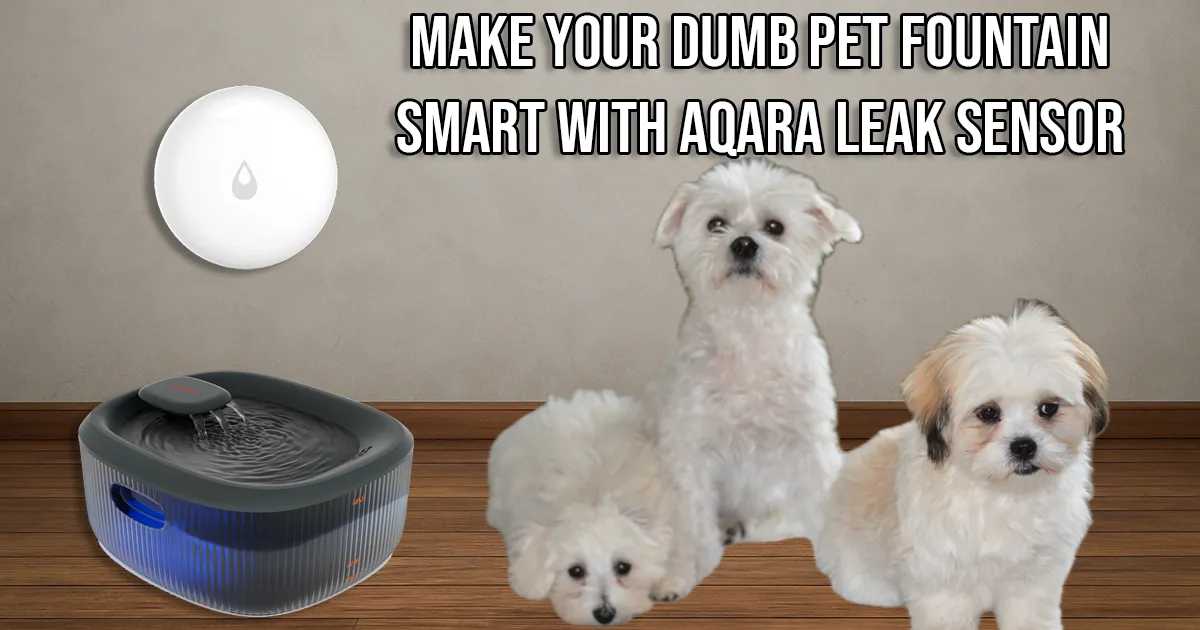
Make Your Dumb Pet Fountain Smart with an Aqara Leak Sensor
Turn your pet fountain smart using an Aqara leak sensor and Home Assistant for low-water alerts.
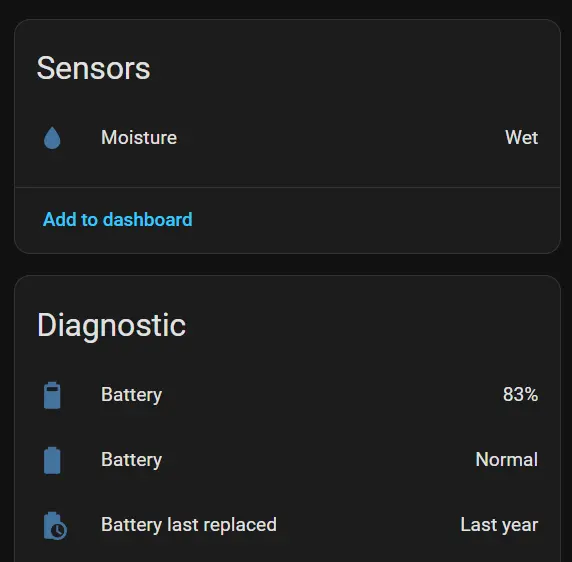
Update (October 2026): Nearly one year after publishing this project, I added the Aqara sensor’s battery results, a presence-aware Alexa reminder with a 30-minute cooldown, and a look at what happens when the pump fails while the basin is still full.
After building a few smart home automations for my dogs, I realized one of the few remaining “dumb” devices was their pet water fountain. It has a built-in light to indicate when it’s empty—but only after the pump is already sucking air. Not exactly smart. With three dogs in the house and one with diabetes, it gets drained fast.
So, I decided to fix that with one of my favorite inexpensive smart home sensors: the Aqara Leak Sensor.
Why I Built This
I got the idea from an X post Aqara shared a while back. Someone used one of their leak sensors to monitor water levels in a swimming pool, and I figured—why not scale that down for a pet fountain?
The concept is simple: the Aqara Leak Sensor triggers when both probes detect continuity through water. If the water drops below the probes, it reports “dry.” By attaching wires to those probes and placing them at the right height in the reservoir, I can have Home Assistant notify me before the fountain runs dry.
Resources for This Project
ChrisHansenTech is a participant in the Amazon Services LLC Associates Program, an affiliate advertising program designed to provide a means for sites to earn advertising fees by advertising and linking to Amazon.com. As an Amazon Associate I earn from qualifying purchases.
- WOPET Dog Water Fountain
- The fountain I use for this project. It has a nice design and runs on 5V DC.
- LeMotech Project Box Black 3.27”x3.19”x2.2”
- May update to this larger box to fit the Aqara sensor inside.
- Aqara Leak Sensor
- Shelly Smart Plug with power monitoring
- BNTECHGO 22 AWG Silicone Wire Kit (Red, Black, White, Blue, Green)
- RTV 4500 Food Contact Safe Silicone Sealant, Clear
- #6-32 × ½-inch Stainless Steel Pan Head Machine Screws
- #6 Nylon Lock Nuts
- #6 Stainless Flat Washers
Most of these are inexpensive and easy to source online or at any hardware store
How It Works
The Aqara Leak Sensor runs on a coin cell battery and detects water through a simple continuity circuit. When water bridges the two probes, it reports “wet”. When the circuit breaks, it reports “dry”.
By extending the two probe leads with wire and stainless steel bolts, the sensor can sit safely outside the fountain while the bolts act as your new probes inside the reservoir.
When the water level drops below those bolts, the sensor switches to “dry”, and Home Assistant can remind someone nearby to refill the fountain.
Here’s how I built it step by step.
Building the Probe Setup
-
Drill the holes
Drill two 9/64″ holes about 1½ inches apart near the low water mark of your fountain’s reservoir. The button heads of the screws should face inside the fountain so they’re flush and easy to clean. -
Seal and insert bolts
Add a thin bead of RTV 4500 silicone around each hole. Insert your #6-32 × ½-inch stainless bolts from inside to outside. Wipe away any excess silicone and let it cure 24 hours. -
Mount the project box
Drill matching holes in your project box for the bolts. Slide the box over the bolt threads, add flat washers, your wire terminals, and nylon lock nuts. A small bead of silicone around the box edge helps make a watertight seal. -
Wire it up
Attach 22 AWG stranded silicone wire to the Aqara sensor’s pads. Use a 2mm hex wrench. Run the wires to your bolts and secure them under the washers inside the box. If you like, coat the connections with a dab of dielectric grease. -
Seal and close
Run a small bead of silicone around the wire entry point.
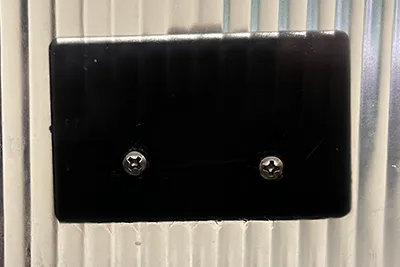 Inside view of the machine screws
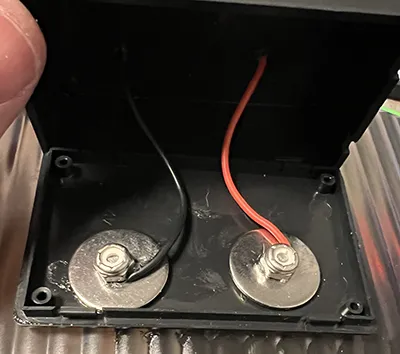 Wires attached to machine screws
Update: Sensor Placement
The project box I originally used turned out to be a bit too small. So, instead, I mounted the sensor directly on the outside of the project box and tucked the bolts and wires neatly inside.
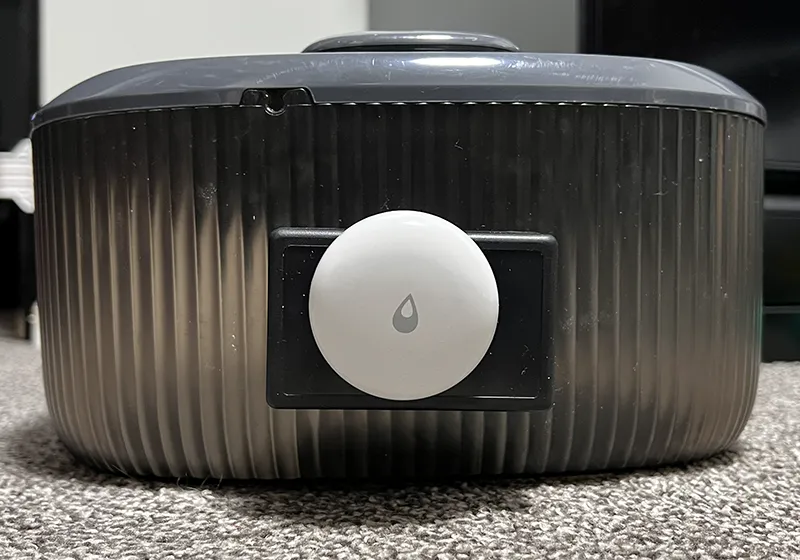 Aqara Leak Sensor attached to project box
This actually turned out better—it shows the Aqara sensor clearly and makes it easier to change the battery later. If you want a fully enclosed version, use a slightly larger box.
Home Assistant Setup
Since the Aqara Leak Sensor is a Zigbee sensor, you can connect it to an Aqara M3 Hub, Zigbee2MQTT, or ZHA. I used Zigbee2MQTT because it is near my three pet feeders, which you can read about in my Automating Meal Time post, which are also connected through Zigbee2MQTT.
Once paired to Zigbee2MQTT or ZHA, your Aqara Leak Sensor will appear as a binary sensor. It reports on when the probes are wet and off when the water drops below them. Replace the placeholder entity ID in the examples below with your own sensor.
The original phone notification
My first automation sent a phone notification as soon as the water dropped below the probes. During the day, it also sent an Alexa announcement. Here is that original, simple version:
1
2
3
4
5
6
7
8
9
10
11
12
13
14
15
16
17
18
19
20
21
22
23
24
25
alias: Dog Water Fountain Low
description: "Send notification when dog fountain water level is low"
triggers:
  - trigger: state
    entity_id:
      - binary_sensor.<your_leak_sensor_entity_id>
    to: "off"
conditions: []
actions:
  - action: notify.<your_mobile_device_notify_service>
    metadata: {}
    data:
      message: 🐶 The dogs' water fountain is low. Please refill it
  - if:
      - condition: time
        after: "06:00:00"
        before: "21:00:00"
    then:
      - action: notify.send_message
        metadata: {}
        data:
          message: The dogs' water fountain is low. Please refill it.
        target:
          entity_id: notify.<your_echo_device_entity_id>
mode: single
That kept Alexa quiet between 9 PM and 6 AM, but the phone alert could arrive while I was working or in a meeting. I would see it, dismiss it, and then forget to refill the fountain. A reminder when someone is actually near the fountain is much more useful.
The presence-aware reminder I use now
I have a motion sensor in the laundry area and a presence sensor in my Aqara W200 thermostat/hub. When the water is low and someone enters or is detected in that area, Alexa announces that the dogs’ water is low.
The first version of that idea needed a cooldown. Someone sitting on the couch could retrigger the W200 every few minutes, while a trip in from the garage could trip the laundry sensor and then the W200 seconds later. Family and guests made it clear pretty quickly that one reminder at a time was plenty.
The example below uses a single Home Assistant timer helper shared by both sensors. Create a timer helper named timer.dog_water_reminder_cooldown under Settings > Devices & services > Helpers with a 30-minute duration and Restore enabled. If you configure helpers in YAML instead, this is the equivalent entry in configuration.yaml:
1
2
3
4
timer:
  dog_water_reminder_cooldown:
    duration: "00:30:00"
    restore: true
Then add this automation, replacing all angle-bracket placeholders with your own entity IDs. The leak sensor is off when the fountain is low and on when the probes are wet again.
1
2
3
4
5
6
7
8
9
10
11
12
13
14
15
16
17
18
19
20
21
22
23
24
25
26
27
28
29
30
31
32
33
34
35
36
37
38
39
40
41
42
43
44
45
46
47
alias: Dog Water Fountain Presence Reminder
description: "Announce low water on nearby activity, with one shared cooldown"
triggers:
  - trigger: state
    entity_id: binary_sensor.<laundry_motion_sensor>
    to: "on"
    id: remind
  - trigger: state
    entity_id: binary_sensor.<w200_presence_sensor>
    to: "on"
    id: remind
  - trigger: state
    entity_id: binary_sensor.<fountain_leak_sensor>
    to: "on"
    id: refilled
actions:
  - choose:
      - conditions:
          - condition: trigger
            id: refilled
        sequence:
          - action: timer.cancel
            target:
              entity_id: timer.dog_water_reminder_cooldown
      - conditions:
          - condition: trigger
            id: remind
          - condition: state
            entity_id: binary_sensor.<fountain_leak_sensor>
            state: "off"
          - condition: state
            entity_id: timer.dog_water_reminder_cooldown
            state: "idle"
          - condition: time
            after: "06:00:00"
            before: "21:00:00"
        sequence:
          - action: timer.start
            target:
              entity_id: timer.dog_water_reminder_cooldown
          - action: notify.send_message
            data:
              message: "The dogs' water is low. Please refill the fountain."
            target:
              entity_id: notify.<alexa_announcement_entity>
mode: queued
max: 10
Both motion and presence check the same timer, so walking from the laundry area to the W200 does not produce a second announcement. Once the 30 minutes end, the timer returns to idle; it does not announce on its own. The next motion or presence event can remind us again if the sensor still says low. Refilling the fountain cancels the timer, so a later low-water event starts fresh. I kept the original daytime hours so the Echo stays quiet overnight.
If I want to make repeated reminders more fun, I could add a separate counter: the first announcement could be polite, the second a little funny, and the third and later ones comically impatient. An LLM or API could vary the wording, but the reminder above works without one.
Safety Notes
The Aqara sensor uses a 3V coin battery, so it’s completely safe to use around water. The pump in most fountains runs on 5 V DC, but since the two systems are isolated, there’s no electrical hazard.
Still, seal your hardware properly and give the silicone 24 hours to cure before refilling the fountain.
Results
When the water drops below the probes, Home Assistant knows the fountain needs a refill before the pump starts running dry. I prefer the presence-aware reminder because it reaches someone when they can act on it, rather than leaving a phone alert for me to forget.
Battery life after nearly a year
One common concern when I first shared this project was that keeping the Aqara leak sensor “wet” most of the time would chew through its CR2032 battery. Nearly a year after the October 19, 2025 publication date, Home Assistant reports 83% battery and a normal battery status for this sensor.
It does appear to use its battery faster than another Aqara leak sensor I have near the sump pump. That one stays dry about 99% of the time and has run for multiple years on the same battery. Staying wet may shorten battery life somewhat, but in my setup it is nowhere near a replace-the-battery-every-month-or-two problem. At 83% after roughly a year, battery life is still very good, and a four-pack of CR2032 batteries is inexpensive enough that the difference is not a meaningful downside for me. This is my result with the Aqara leak sensor used in this project; I would not assume another brand or model behaves the same way.
When the basin is full but the pump has failed
I also had a submersible pump fail while the main basin was still full. The Aqara sensor correctly reported water at its probe level, so Home Assistant thought the water level was fine. From the dogs’ perspective, the fountain was not fine: no water was being pumped into the area where they actually drink.
This sensor answers “Is water present at this level?” It cannot answer “Is the fountain actually circulating water?” A power-monitoring smart plug or outlet could add that second check. I could watch the pump’s normal wattage or current draw and have Home Assistant alert me if the basin reads full but the pump draw drops near zero or outside its normal range. I have not added or tested that monitoring yet, so it is a possible additional safeguard alongside the water-level sensor.
This setup also ties in nicely with my other pet automations, like the smart pet feeders. Since I have an older diabetic dog, I also use the Home Assistant calendar to have Alexa announce twice a day when it’s time for his insulin.
Final Thoughts
This project is a great example of how a simple sensor can turn something ordinary into something smart and practical. It’s cheap, quick to build, and solves a real problem: I know when the dogs’ fountain needs water, and the reminder reaches us when we can do something about it. The failed pump also gave me a useful next project: monitoring circulation as well as water level.
If you try this yourself, let me know how it goes.
Frequently Asked Questions
How long does the Aqara leak sensor battery last in the pet fountain?
After nearly one year, Home Assistant still reports 83% battery and a normal battery status for the Aqara leak sensor in my fountain. It seems to drain faster than my Aqara sensor that stays dry almost all the time, but the drain has not made this project impractical. I am not replacing the CR2032 every month or two. This is my experience with this Aqara sensor, not a prediction for other leak sensor brands or models.
Want to share your thoughts or ask a question?
This blog runs on coffee, YAML, and the occasional dad joke.
If you’ve found a post helpful, you can
support my work or
☕ buy me a coffee.
Curious about the gear I use? Check out my smart home and homelab setup.