Aqara Thermostat Hub W200 Review and Home Assistant Setup
Hands-on review of the Aqara Thermostat Hub W200, including installation, Matter setup in Home Assistant, what works well, and a few things that still need improvement.
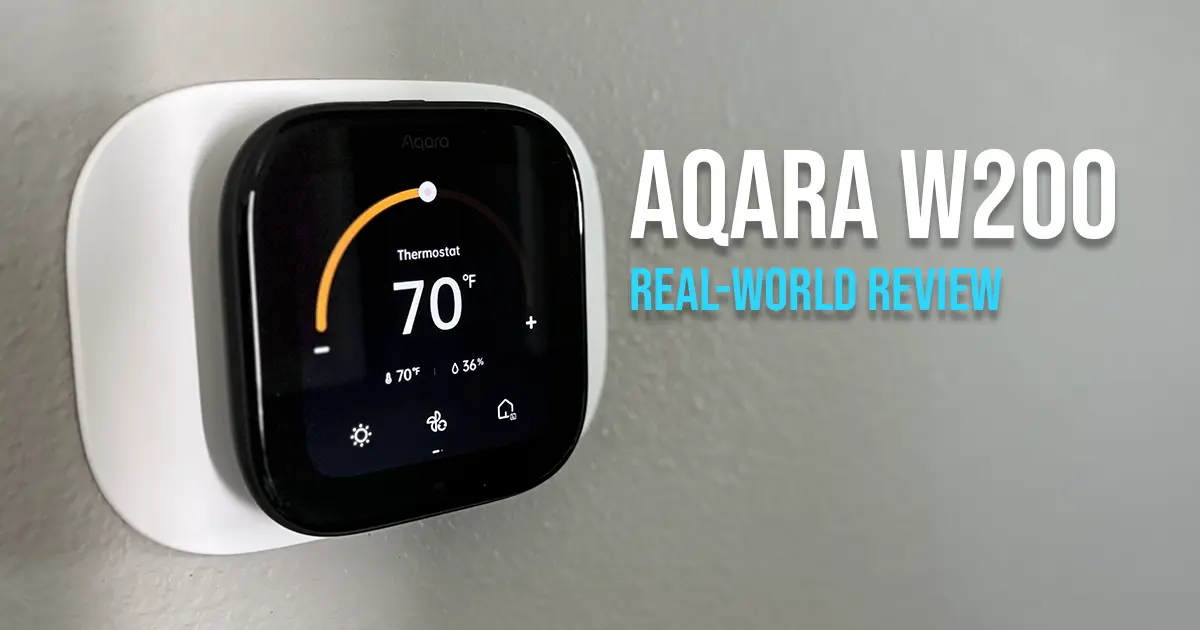
When we first moved into our current house three years ago, I replaced the basic thermostat with the ecobee Premium, which I connected to Home Assistant using the HomeKit integration. It worked great as a thermostat, and I liked that it also doubled as an Alexa voice assistant device.
However, as newer tech like Alexa+ came out, the ecobee started to feel stuck in its older feature set. Having a mix of voice assistants is also annoying. One does one thing better, the other does something else better, and before long you are working around both.
When I saw Aqara release the Thermostat Hub W200, I decided to give it a try. I already use quite a few Aqara devices in my house, so it seemed like a good fit for my setup.
Installation
Installation was straightforward and an easy swap from the ecobee. My HVAC system only has heat and A/C, so the wiring was simple.
Like most Aqara devices, the setup is well documented, and the Aqara app walks you through the entire installation process.
To connect the Thermostat Hub W200 to Home Assistant, you use Matter through the Aqara app, similar to connecting other Aqara hubs like the Aqara M3 Hub. Once connected, the thermostat shows up in Home Assistant as a Matter device, and any Aqara devices paired to the hub also appear in Home Assistant.
If you are in the Apple ecosystem, you can also connect it through HomeKit and use features like adaptive temperature and energy management.
Review
The Aqara Thermostat Hub W200 includes the standard smart thermostat features you would expect, including heating and cooling presets, schedules, alerts, maintenance reminders, and temperature and humidity monitoring.
You can also pair additional sensors if you want more granular control throughout the house.
After a week of using it, here are my thoughts.
Note: Since I do not have an Aqara doorbell, I was not able to test the doorbell video feature.
What I like
The first thing I noticed is that it is slightly smaller than the ecobee Premium, which I actually prefer. The UI also looks nice, and Aqara currently provides two themes.
The built-in presence sensor works better than the one on the ecobee. That has been useful since I already have automations tied to presence. For example, if the dog water fountain is low, I have Alexa announce it when someone walks into the room.
Having it double as an Aqara hub is also a big plus. It is installed in a central location in the house, which helps with connectivity. I have not gotten around to moving my M3 hub to a better location yet, so this has already helped with devices like my Aqara curtain drivers.
Being able to control devices like my Aqara U100 smart lock from the thermostat is also a nice bonus.
You can add up to six additional screens to the thermostat for services like weather and clock, devices, and scenes. Aqara includes fifteen different layouts for these screens.
These layouts use a mix of device blocks and button blocks. Device blocks can show extra controls for the selected device or service, while button blocks act as quick actions for devices or scenes.
This ended up being one of my favorite features. That ended up being more useful than I expected, especially in a house where not everything needs to be voice controlled.
My wife summed it up pretty well when I showed her how she could dispense the dog feeders from the thermostat instead of opening an app or asking a voice assistant.
“Oh, that’s nice.”
That is about as strong of an endorsement as a smart home feature gets.
What needs improvement
One of the first things I noticed was that the Midea dehumidifier in the hallway was not running as often as it did when I was using the ecobee humidity reading for the automation.
After looking into it, I found that the Aqara thermostat does not update humidity readings very frequently. The values tend to stay flat for longer periods, which makes it less useful for automations where you need more granular changes.
For now, I switched to using an Aqara Temperature and Humidity Sensor T1 to control the dehumidifier instead.
The difference becomes obvious when you look at the history charts:
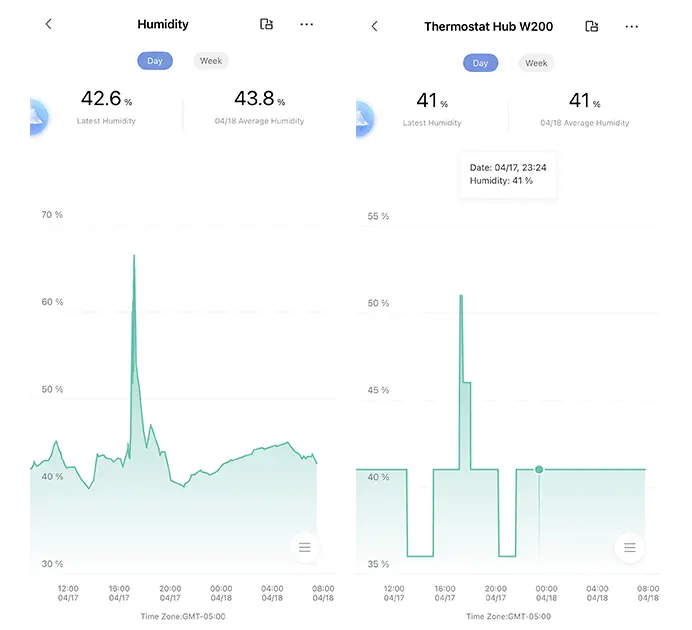 Humidity history: Aqara T1 (left) vs W200 (right)
What’s interesting is that both sensors capture the same overall pattern—you can see the same spikes and dips in each graph.
The difference is resolution.
The T1 shows those changes in detail, while the W200 flattens them into fewer data points. That loss of detail makes it less useful for automation, which explains why my dehumidifier was not running as often.
I would also like to see Aqara improve the additional screen feature. Right now, the button areas do not feel as polished as they could.
A few things I noticed:
- Text truncates too aggressively, such as
Living roo... - Text could be a little larger and wrap better
- The screen still uses a generic scene icon instead of the one you selected
- There is a noticeable amount of unused space in the layout
Additionally, it would be nice if you could use third-party Matter devices directly on these screens. Currently, only Aqara devices can be added directly.
If you want to control a third-party Matter device, the workaround is to create a scene that includes the device and then link that scene to a button.
These are not deal-breakers, but they do make the feature feel a little rough around the edges compared to the rest of the device.
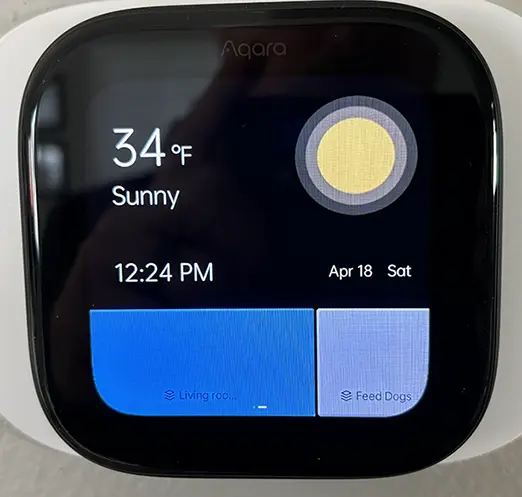 Aqara W200 additional screen showing weather and scene buttons
How to set up screens
One of the standout features of the W200, compared to other thermostats, is the ability to add extra screens for devices, scenes, and services. This turns it from something you just glance at into something you actually use.
For example, I added controls for the weather, the Aqara U100 smart lock, and my dog feeders. That gave us a quick way to handle them without needing a voice command or opening an app.
The basic process in the Aqara app is straightforward:
- Open the Aqara app.
- Select the Thermostat.
- Select Device Linking & Screen Settings.
- Under Screen Configuration, select Create.
- Select a layout, then select Confirm.
- Select one of the available blocks in the layout.
- Choose the device, service, or scene to assign.
- Select Back to exit.
The thermostat updates instantly after making changes.
There are fifteen layout options, so it is worth trying a few to see what actually works on the screen in real use.
If you plan to use scenes here, I recommend keeping the names short. Otherwise, they get cut off pretty quickly.
Here is what the layout looks like in the Aqara app:
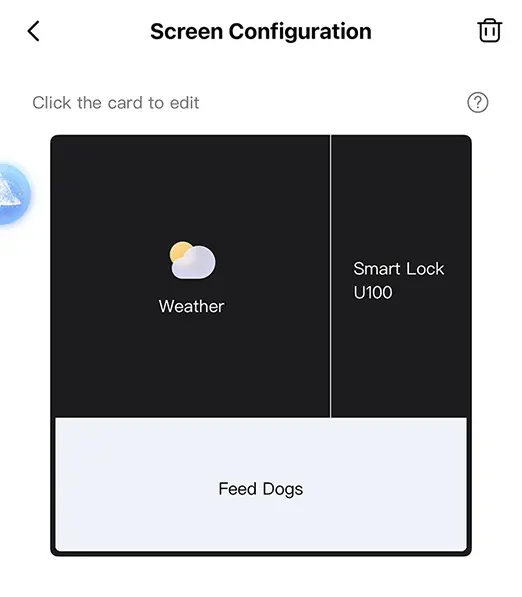 Editing a screen layout in the Aqara app
And here is how that same layout looks on the thermostat:
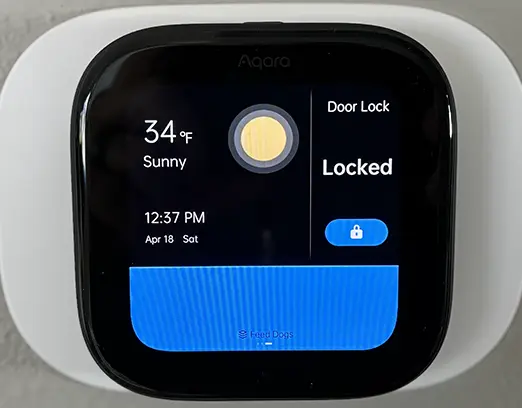 Resulting layout displayed on the thermostat
In my case, I found layouts with fewer, larger buttons worked better than trying to fit too many devices on a single screen.
Home Assistant setup
The W200 integrates with Home Assistant using Matter through the Aqara app. The process is straightforward and takes just a few minutes.
You do not need a separate Aqara hub for this. The W200 is an Aqara hub itself. You will still use the Aqara app for the initial setup and to generate the Matter pairing code.
- From the Thermostat Hub W200 device in the Aqara app, select the ellipses (…).
- Select Third-Party Matter Ecosystems.
- Select Matter Pairing Code.
- Select Copy pairing code.
- Switch to the Home Assistant Companion app.
- From the Devices & Services screen, select Add Integration.
- Select Add Matter Device.
- Select No, it’s new.
- On the Add Accessory screen, select More options.
- Select the detected Aqara Thermostat device.
- Paste the Matter code.
- Select Add to Home Assistant.
- Optionally update the device name, then select Continue.
- Select Done.
Once paired, the thermostat shows up in Home Assistant as a Matter device, and any Aqara devices connected to it can also be exposed through Matter.
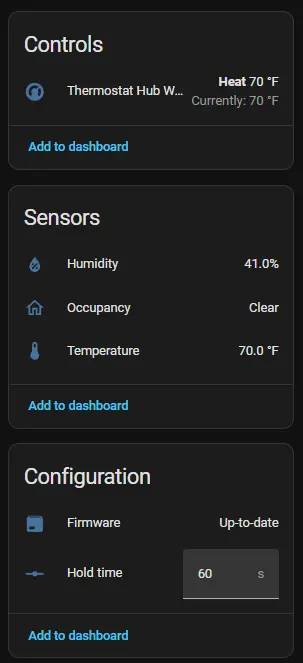 Home Assistant entities for Aqara W200
In my setup, the thermostat exposed entities for:
- Current temperature
- Target temperature
- HVAC mode
- Humidity
One thing to keep in mind is that Matter integrations are still somewhat limited compared to native integrations. Not all features available in the Aqara app are exposed in Home Assistant.
One nice part of this setup is that Aqara devices paired to the W200 hub can also show up in Home Assistant through Matter. That gives the thermostat more value than just being a thermostat, since it can also act as another Aqara hub in your house.
If the device does not show up during pairing, make sure:
- Your phone and Home Assistant are on the same network
- Bluetooth is enabled on your phone
- The pairing code has not expired
Since I work from home, I do not have a lot of complex thermostat automations beyond normal scheduling. Where this ended up being more useful for me was presence-based reminders.
Because the thermostat is in a high-traffic area, I use its presence sensor as a trigger point for household reminders. For example, if the dog water fountain is low, Home Assistant can announce it when someone walks into the room instead of sending a notification that might get ignored.
Here’s one example of how I’m actually using it:
1
2
3
4
5
6
7
8
9
10
11
12
13
14
15
16
17
18
19
20
21
22
23
alias: Dog Water Fountain Low Voice Reminder
trigger:
  - platform: state
    entity_id:
      - binary_sensor.thermostat_presence
      - binary_sensor.hallway_motion
    to: "on"

conditions:
  - condition: state
    entity_id: binary_sensor.dog_water_fountain_low
    state: "on"

  - condition: time
    after: "06:00:00"
    before: "21:00:00"

action:
  - service: notify.voice_assistant
    data:
      message: "The dog water fountain is low. Please refill it."

mode: single
In my setup, I am using an Aqara leak sensor to detect when the water
level is low. Since it is designed to detect water, the state is
actually off when the fountain is empty and on when water is
present.
If you want to see how I set that up, I covered it in more detail here: Make Your Dumb Pet Fountain Smart with an Aqara Leak Sensor.
Resources in This Post
ChrisHansenTech is a participant in the Amazon Services LLC Associates Program, an affiliate advertising program designed to provide a means for sites to earn advertising fees by advertising and linking to Amazon.com. As an Amazon Associate I earn from qualifying purchases.
Hardware
- Aqara Thermostat Hub W200
- ecobee Smart Thermostat Premium
- Aqara Temperature and Humidity Sensor T1
- Aqara Water Leak Sensor
Final thoughts
Overall, I think the Aqara Thermostat Hub W200 is a solid device.
The additional screens make it more than just something you glance at as you walk by. It becomes something you actually interact with, and that alone makes it feel different from most thermostats.
The built-in hub functionality is also nice, especially if you already use Aqara devices and want another hub in a central location.
It is not perfect. The humidity update behavior was a disappointment for my dehumidifier automation, and the additional screen UI could use some refinement. Still, none of that has been enough to make me want to take it off the wall.
Aqara has also done a good job of pushing firmware updates to its devices, so I expect the W200 will continue to improve over time.
If you are already using Aqara devices, it fits in naturally. If not, the additional screens and hub functionality still make it worth considering over more traditional thermostats.
Want to share your thoughts or ask a question?
This blog runs on coffee, YAML, and the occasional dad joke.
If you’ve found a post helpful, you can
support my work or
☕ buy me a coffee.
Curious about the gear I use? Check out my smart home and homelab setup.