Documenting My Homelab, Part 1: Migrating Core Infrastructure to a Dedicated HomeLab VLAN
Migrating core homelab infrastructure into a dedicated VLAN, defining trust boundaries, and documenting the decisions that make the system understandable and resilient.
When I first started my homelab, it was simple.
One Intel NUC.
A handful of Docker containers.
A flat network.
It did what I needed, and more importantly, it was easy to reason about.
Over the years, though, that simplicity quietly disappeared.
When “Just Add One More Thing” Stops Working
As the homelab grew, so did everything around it:
- More containers
- More services
- More VLANs
- More IoT devices
- More firewall rules added reactively
At one point I even got a warning about running low on DHCP addresses, which is usually a sign that your “small setup” isn’t small anymore.
None of this happened because I was careless. It happened because I was focused on the fun parts:
- adding new services
- experimenting with automations
- solving immediate problems
What I wasn’t doing was documenting my intent.
And once a system reaches a certain size, intent matters more than configuration.
Why This Is a Series
This post is Part 1 of a series where I’m finally slowing down and doing something I should have done years ago:
- explicitly defining trust boundaries
- separating infrastructure from experiments
- and documenting everything in a way that future-me (and ChatGPT) can reason about
Each post in this series will focus on one bounded change, not the entire homelab at once.
This series isn’t about perfection, it’s about making systems understandable again.
Part 1 is about migrating core infrastructure off an aging, power-hungry box and using that opportunity to establish better patterns.
The Catalyst: Replacing an Always-On Optiplex
 Dell Optiplex Desktop PC
For a long time, my internal DNS and reverse proxy were running on a Dell Optiplex with a Core i5.
It worked fine.
It was stable.
It was also massively overkill for what it was doing.
More importantly, it had become a single, poorly documented anchor point for multiple critical services:
- DNS
- internal name resolution
- internet ingress via reverse proxy
If that machine failed, I could recover—but only because I remembered how everything fit together.
That’s not a great place to be.
So the decision was made to migrate those services to a small, efficient Intel N150 system and treat it as intentional infrastructure, not just “the box that happens to be running DNS.”
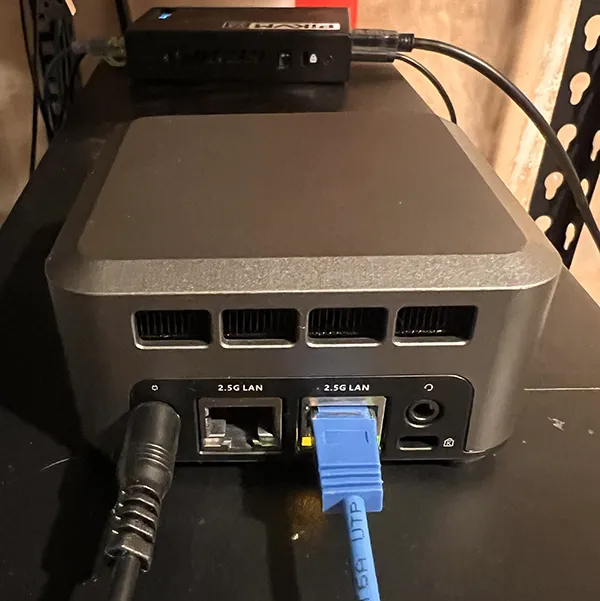 N150 Mini PC
I named that machine zero-cool - Hack the Planet!
Introducing a Real HomeLab VLAN
This migration wasn’t just a hardware swap.
It was the point where I stopped treating “homelab” as an abstract idea and made it a first-class network boundary.
The target network layout became:
- Default LAN – user devices
- Home Assistant also lives here. I’m aware that strict IoT VLAN purists may disagree, but keeping it on the LAN simplifies integration across a wide range of devices and aligns with my own risk tolerance.
- HomeLab VLAN – internal infrastructure and services
- Ingress VLAN – internet-facing entry points only
- Work VLAN – isolated work devices and VMs
The rule going forward is simple:
- VLANs define trust boundaries.
- The firewall enforces policy.
- Services do not decide who can talk to them.
This post focuses specifically on moving services into the HomeLab VLAN for the first time.
A Boring Infrastructure Host (On Purpose)
The N150 system running zero-cool has a deliberately narrow role:
- internal DNS
- internet ingress
- nothing else
It is dual-homed:
- one NIC on the HomeLab VLAN
- one NIC on the Ingress VLAN
Only the HomeLab interface has a default gateway.
The Ingress interface exists purely to accept traffic and forward it.
That single design choice eliminates a whole class of routing ambiguity and makes the machine’s purpose obvious.
Why I Used Docker macvlan for Core Services
For infrastructure services, I wanted containers to behave like real hosts:
- their own IP addresses
- no Docker NAT
- no port publishing
- firewall rules that reference services directly
Docker’s macvlan mode fits that model well, as long as you understand its trade-offs.
In an environment built on UniFi switching and a UDM SE, macvlan isn’t an outlier, it aligns naturally with a zone-based firewall model where VLANs define trust boundaries and all policy enforcement lives at the gateway.
Each core service now has:
- a static IP
- a clear firewall identity
- no dependency on Docker’s internal networking
This makes the network easier to reason about and keeps all cross-VLAN policy centralized at the firewall.
DNS as the First Migration
DNS was the first service I moved, because if DNS is wrong, everything else becomes harder to debug.
The design is intentionally simple:
- Unbound as the recursive resolver and source of truth
- AdGuard Home as the client-facing filter and UI
- both running in Docker
- both on the HomeLab VLAN
- both with static IPs
AdGuard forwards to Unbound.
Unbound decides what’s real.
Filtering and authority are separate responsibilities, and I wanted the architecture to reflect that.
Migrating AdGuard from bare metal to Docker turned out to be refreshingly boring: copy the config and data directories, update a couple of IP addresses, and start the container. Same users, same settings, no reset.
That’s exactly how infrastructure should behave.
Centralizing Cross-VLAN Policy
One deliberate decision I made during this migration was to handle all cross-VLAN communication exclusively at the firewall.
No container-level firewall rules.
No hidden Docker exceptions.
No “temporary” allowances that get forgotten later.
If traffic crosses VLANs, it does so because the firewall allows it. Period.
This keeps policy visible, auditable, and easy to reason about—especially when macvlan is involved.
Management Is a Separate Plane
Portainer runs on a different machine.
On zero-cool, I only run the Portainer Agent.
It uses the default Docker bridge network and talks to the Docker API. It does not participate in service traffic at all.
Management traffic and service traffic are different planes, and treating them that way keeps the design clean.
The Real Change: Documentation First
I didn’t do this in long, uninterrupted work sessions. Most of it happened in short windows—early mornings, quiet afternoons, and the space between family time.
That constraint actually helped. When time is limited, you stop chasing clever solutions and start writing down the ones you won’t have to rethink later.
The most important part of this migration wasn’t VLANs, Docker, or new hardware at all.
It was deciding that documentation is part of the system, not an afterthought.
This time, I’m documenting:
- hosts
- networks
- services
- and, critically, the decisions behind them
All of this lives in Obsidian using structured templates. I also have a script that compiles those notes into a single master document that I can use with a ChatGPT project when planning changes or troubleshooting issues.
That means future questions like:
- What breaks if this host dies?
- Why does this firewall rule exist?
- What happens if I move this service?
don’t rely on memory anymore.
One thing I’ve learned, both in tech leadership and in running systems at home, is that problems don’t usually come from chaos—they come from neglected order.
It’s easy to blame complexity, but most failures trace back to decisions we postponed or never wrote down. Documentation forces you to confront those decisions early, while they’re still cheap to fix.
Resources in This Post
ChrisHansenTech is a participant in the Amazon Services LLC Associates Program, an affiliate advertising program designed to provide a means for sites to earn advertising fees by advertising and linking to Amazon.com. As an Amazon Associate I earn from qualifying purchases.
These are the tools and hardware I’m using as part of this migration. They’re listed for reference, not as requirements.
-
KingSpec 512GB M.2 NVMe SSD, 2242 PCIe - SSD used in the N150 box.
What’s Next
At this point:
- DNS has been fully migrated
- the HomeLab VLAN is active
- the new infrastructure host is stable
- the old Optiplex is still available for rollback
The next post in this series will cover migrating ingress and reverse proxy services and finally decommissioning the old box.
This time, I’m not rushing to the fun parts.
I’m writing things down first.
Want to share your thoughts or ask a question?
This blog runs on coffee, YAML, and the occasional dad joke.
If you’ve found a post helpful, you can
support my work or
☕ buy me a coffee.
Curious about the gear I use? Check out my smart home and homelab setup.